
Cox Business Security Services5.3.1 - App Store
You'll be able to see results in few seconds.
Publisher Description
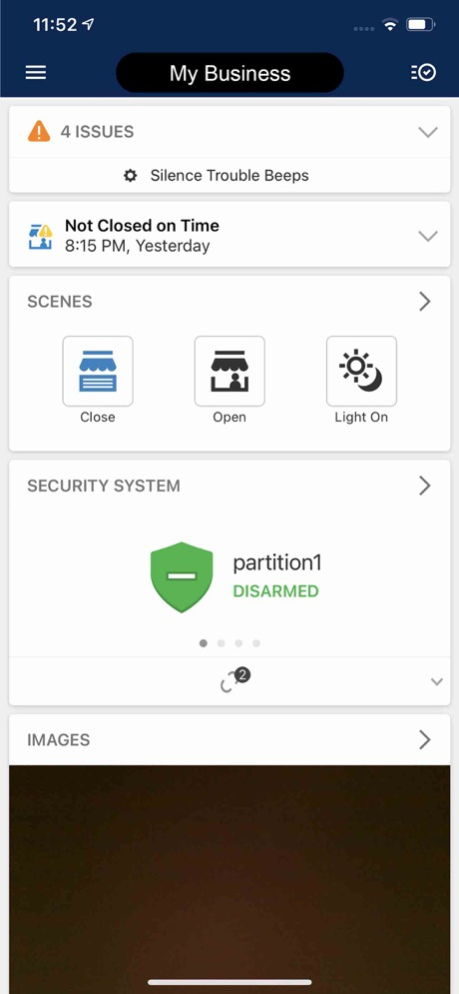

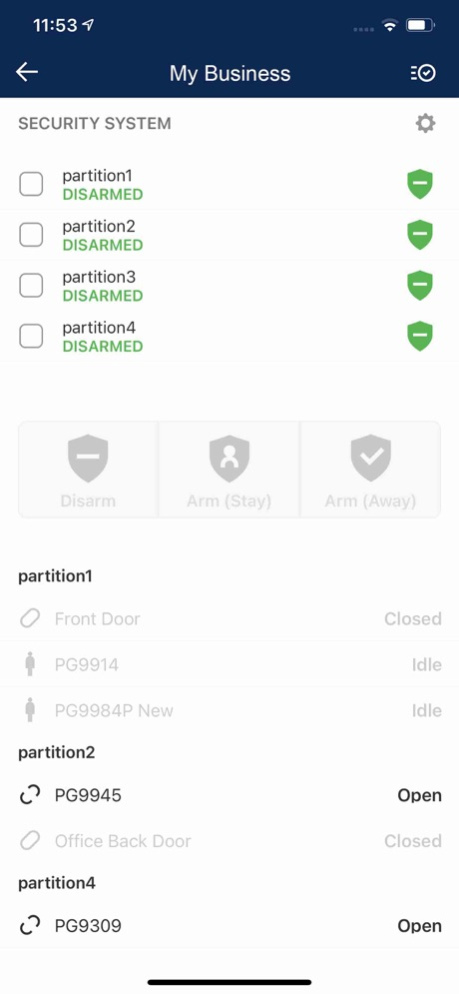

Cox Business Security Solutions allow you to protect, monitor and optimize your business, whether onsite or remotely using your PC, mobile phone or tablet. This app brings the control of your interactive security, automation and video monitoring services to your fingertips with remote access via your phone app or tablet. With Cox Business Security Solutions, you can:
· Arm or disarm your business security system
· Add or change system user codes
· Search and review your system event history
· Access and view live video and recorded clips from your security cameras*
· Turn the lights on before you arrive
· Adjust the thermostat settings or assign a schedule to optimize heating and cooling
· Receive open/close notifications and activity reports for one or more locations
· Create and schedule Scenes
You can also receive real-time email, text message and push notifications for specific events that matter to you and your business. You can immediately know:
· When important emergency related events occur
· If there are log-in attempts on your account
· When your system is disarmed and who disarmed it
· When your thermostat is changed
· If your business is not armed when expected
· If a water leak or flooding is detected
Note: *This app requires a compatible system and a Cox Business Security Solutions service plan. Feature availability varies based on the system, equipment and service plan. Visit www.coxbusiness.com for more information.
Coxbusiness.com website > Cox Business Security Solutions Support >
Jun 6, 2024
Version 5.3.1
• An upgraded landing screen for Video Device Settings allows users to check cameras at-a-glance. New screens are accessible from the Device Overviews that let users adjust audio and run through basic troubleshooting steps.
• Custom icons are now available for smart lighting and switch devices in the app and web portal. Users can select their preferred icon for each device to easily tell them apart, which is ideal when using multiple lighting devices or plug in-controlled appliances for a better way to differentiate devices, enjoy a more flexible and improved remote control and automation experience.
• Now video users can keep better tabs on their properties and view up to four live streams at a time in the mobile app; aw well as manage camera groups with ease.
•When the account has a single camera, the pop up explaining how to use multi-video feed no longer appears.
•Removed the Cancel button from the prompt that displays before granting Location Services permissions to comply with Apple's permission request guidelines.
•Resolved an issue that caused the app to crash when tapping mode, fan or schedule on Apple Watch.
•Resolved an issue on the iOS Mobile App Continuous Recording Player where the Go to Live Video overlay was being displayed at the time of latest recording and not the present time.
•Replaced the Go to Onboard and Go to SVR buttons on the Mobile App Activity page with a singular Go to Recordings button.
•Resolved an issue on iOS where the activity history would not refresh and display new events even when tabbing back and forth between Activity and other tabs.
About Cox Business Security Services
The company that develops Cox Business Security Services is Cox Communications, Inc.. The latest version released by its developer is 5.3.1.
To install Cox Business Security Services on your iOS device, just click the green Continue To App button above to start the installation process. The app is listed on our website since 2024-06-06 and was downloaded 0 times. We have already checked if the download link is safe, however for your own protection we recommend that you scan the downloaded app with your antivirus. Your antivirus may detect the Cox Business Security Services as malware if the download link is broken.
How to install Cox Business Security Services on your iOS device:
- Click on the Continue To App button on our website. This will redirect you to the App Store.
- Once the Cox Business Security Services is shown in the iTunes listing of your iOS device, you can start its download and installation. Tap on the GET button to the right of the app to start downloading it.
- If you are not logged-in the iOS appstore app, you'll be prompted for your your Apple ID and/or password.
- After Cox Business Security Services is downloaded, you'll see an INSTALL button to the right. Tap on it to start the actual installation of the iOS app.
- Once installation is finished you can tap on the OPEN button to start it. Its icon will also be added to your device home screen.
Program Details
System requirements
Download information
Pricing
Version History
version 5.3.1
posted on 2024-06-06
Jun 6, 2024
Version 5.3.1
• An upgraded landing screen for Video Device Settings allows users to check cameras at-a-glance. New screens are accessible from the Device Overviews that let users adjust audio and run through basic troubleshooting steps.
• Custom icons are now available for smart lighting and switch devices in the app and web portal. Users can select their preferred icon for each device to easily tell them apart, which is ideal when using multiple lighting devices or plug in-controlled appliances for a better way to differentiate devices, enjoy a more flexible and improved remote control and automation experience.
• Now video users can keep better tabs on their properties and view up to four live streams at a time in the mobile app; aw well as manage camera groups with ease.
•When the account has a single camera, the pop up explaining how to use multi-video feed no longer appears.
•Removed the Cancel button from the prompt that displays before granting Location Services permissions to comply with Apple's permission request guidelines.
•Resolved an issue that caused the app to crash when tapping mode, fan or schedule on Apple Watch.
•Resolved an issue on the iOS Mobile App Continuous Recording Player where the Go to Live Video overlay was being displayed at the time of latest recording and not the present time.
•Replaced the Go to Onboard and Go to SVR buttons on the Mobile App Activity page with a singular Go to Recordings button.
•Resolved an issue on iOS where the activity history would not refresh and display new events even when tabbing back and forth between Activity and other tabs.
version 4.21.24
posted on 2023-05-04
May 4, 2023
Version 4.21.24
- Continued bug fixes and enhancements for iOS
- Fixed an issue where the play button was unresponsive after playing certain saved video clips, making it difficult to replay the clip.
- Resolved a crash related to swiping to delete a video clip on the Saved Videos tab.
- For customers with multiple systems, we resolved an issue where pausing notifications from a notification message would pause a rule on the incorrect system. - Notifications no longer show the option to pause recording rules if the notification received does not correspond to a system for which the customer is currently logged in to the app on the same device.
version 4.21.18
posted on 2023-01-26
Jan 26, 2023
Version 4.21.18
- Continued bug fixes and enhancements
- Smarter Business Temperature Monitoring for commercial customers.
- Various accessibility enhancements to screen reader performance.
version 4.21.11
posted on 2022-07-15
Jul 15, 2022 Version 4.21.11
Account Management pages are now available in the Mobile App, including: Account Information, System Information, Property Information
version 4.20.1
posted on 2022-01-26
Jan 26, 2022 Version 4.20.1
- Support for Landscape Mode and bug fixes
- The app layout now supports a horizontal view when rotated into landscape mode.
version 4.17.3
posted on 2021-04-14
Apr 14, 2021 Version 4.17.3
Minor bug fixes
Disclaimer
Official App Store Link
We do not host Cox Business Security Services on our servers. We did not scan it for viruses, adware, spyware or other type of malware. This app is hosted by Apple and passed their terms and conditions to be listed there. We recommend caution when installing it.
The App Store link for Cox Business Security Services is provided to you by apps112.com without any warranties, representations or guarantees of any kind, so access it at your own risk.
If you have questions regarding this particular app contact the publisher directly. For questions about the functionalities of apps112.com contact us.
